

TL;DR
- Ready-to-go Zoho CRM verticals are advertised in Australia from $75 per user per month on Professional and $125 on Enterprise, both excluding GST
- Add a $350 setup fee per account, charged once, and budget separately for custom work, which one Australian partner rates at $250 per hour
- A 15-day free trial with no credit card exists specifically so you can test the data model before migrating anything into it
- The moment real customer records land in the system, the Australian Privacy Principles apply to how you hold them
Short version: the licence is the cheap part. What the project costs is the arguing you do about your own data before a single record moves.

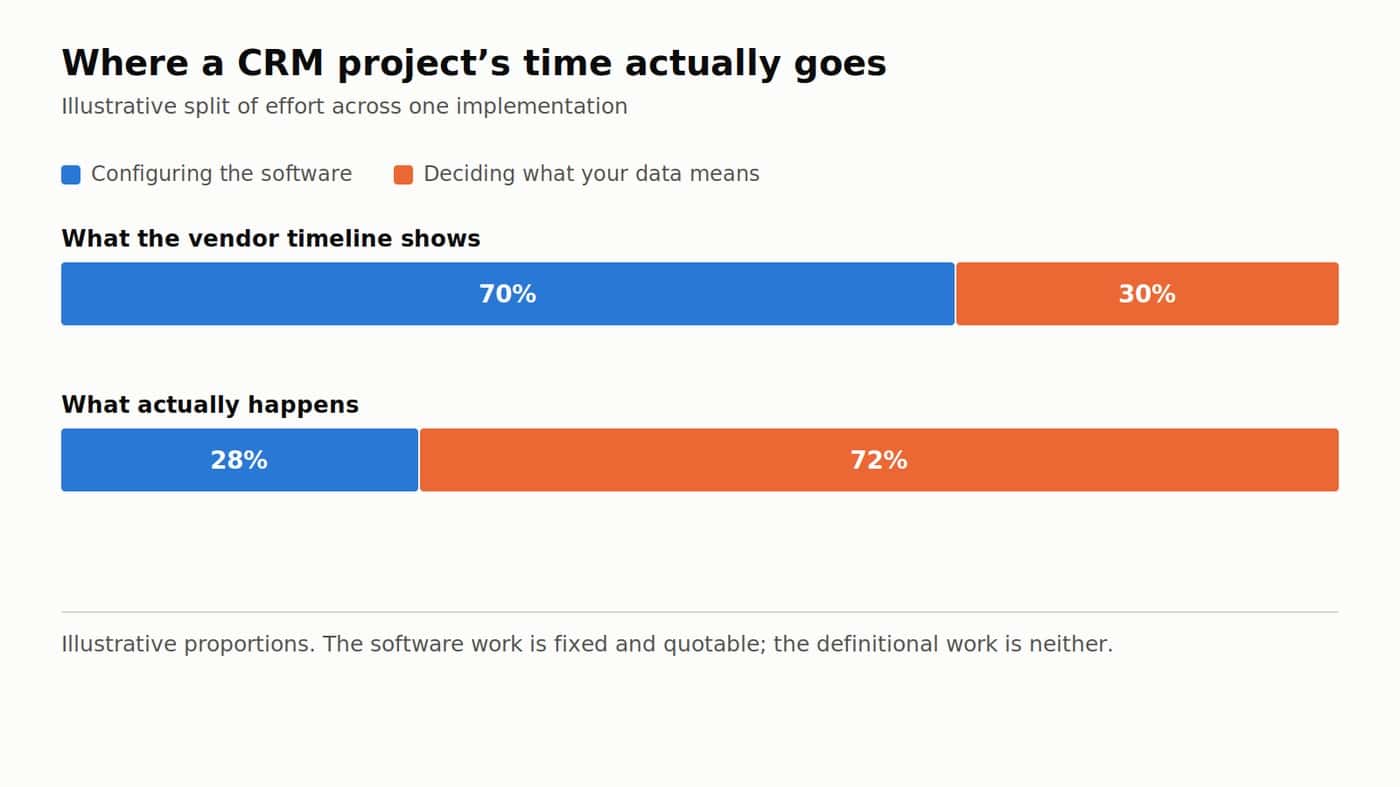
Most CRM projects do not fail at the software. They fail in the fortnight nobody scheduled, when it turns out three departments disagree about what counts as a customer.
The software gets configured in days. Definitions take longer, and no vendor timeline includes them.
Where the money goes
Licence cost is the number everyone compares. It is also the smallest line in the project. Here is what the bands look like in the Australian market for a packaged Zoho CRM vertical, using published rates rather than quotes.
| Line item | Typical figure | What it covers |
|---|---|---|
| Professional licence | $75 per user per month, excl GST | Lead capture, client database, scheduling, calendar sync, mobile access, basic reporting |
| Enterprise licence | $125 per user per month, excl GST | Everything above plus quoting, invoicing, payment tracking, timesheets, job costing, Xero |
| Setup fee | $350, charged once per account | Account configuration and access to implementation resources |
| Custom development | $250 per hour | Anything outside the packaged vertical |
| Voice AI add-on | from $175 per month | Retell AI voice agents answering and qualifying inbound calls |
Some Australian partners publish these rates rather than quoting privately, which makes comparison easier. Dynamic Digital Solutions, a Zoho partner of eight years, prices Zoho CRM implementation in Australia from that $75 per user per month, with the same $350 setup fee whichever tier you pick.
Notice what the table leaves out. Your time. Two people at forty hours each, at whatever you value them, dwarfs the licence in year one, and it is the one budget line nobody writes down.
The part that stalls: the data you already have
Every business arrives at a CRM project with an existing system, even when it insists it does not. Usually a spreadsheet. Sometimes four of them. It survived this long because it works well enough for the person who built it, and spreadsheets are genuinely good at a lot of everyday jobs, so it is worth being honest about which of those jobs the CRM is really replacing.
Migration is rarely the hard part. The questions migration forces are:
- Is a company one record, or is every contact at that company a record?
- What happens to the two hundred rows where the phone number field contains a note instead of a phone number?
- Which of your four date columns will reporting use?
- Who owns a lead that three people have touched?
None of those are software questions and your vendor cannot answer any of them. They are the implementation. Answer them badly and you get a CRM everyone opens once, finds wrong, and quietly abandons for the spreadsheet that was at least theirs.
Once real customer data is in there, it is a compliance object
A CRM full of names, phone numbers, addresses and notes about people is a database of personal information. It stops being a private internal tool the moment it holds one. The Australian Privacy Principles set the standards for how covered organisations collect, use, disclose and secure that information, and they are principles-based rather than a checklist, so the answer to most questions is “it depends on what you did and why”.
Three setup decisions follow from that, and people usually make all three on autopilot. Who sees the full record versus a limited view. How long you keep a lead who never converted. And whether the free-text notes field, where staff write whatever they like, is somewhere you want a subject access request to land.
Decide those during setup. Retrofitting a permission model onto a CRM that has been live a year is its own project, with its own budget.
Where AI fits, and where it does not
Two different things get called AI in a CRM conversation. The first is an assistant inside the system, summarising a record or drafting a follow-up. Zoho ships Zia for this; some partners wire in Claude instead.
The second is a voice agent, of the Retell AI kind, answering the phone, qualifying the caller and writing the result into the CRM with no human in the loop. Genuinely different proposition, and it only works if the CRM underneath it is clean. Point a voice agent at a messy data model and you get messy records, faster than a person could make them.
Neither is a reason to start a CRM project. Both are reasons to finish one properly.
The walkthrough below runs through a packaged Zoho suite end to end, which is useful mainly for seeing how the modules connect before you commit to a shape.
Video: The All-In-One Business Suite You Didn't Know About (watch on YouTube).
A realistic sequence
Run the trial before you buy anything. Fifteen days is enough to import a hundred records and find out which of your assumptions is wrong, and with no credit card the only thing it costs is attention.
Then define your objects. Company, contact, deal, job, whichever your business runs on, and write the definitions down somewhere other than a meeting. Then configure. Then migrate. Then train, starting with whoever resists hardest, because they are usually resisting for a reason worth hearing.
Businesses that get value out of a CRM are not the ones who bought the best software. They are the ones who did the boring definitional work first, so that when the software arrived there was something coherent to put in it.


